Loading
Showing posts with label Samsung. Show all posts

Samsung Galaxy S4 rooted Rom Omega v9.0 Jelly Bean 4.2.2

Features:

Kernel Stock XXUBMGA
csc multi set to BTU

How to Root Samsung Galaxy Ace S5830

Are you still searching for Rooting method of Samsung Galaxy Ace S5830 ? then you are at the right place here i am writing the steps for Rooting your Samsung Galaxy Ace S5830.


How to Install Clockworkmod (CWM) Recovery on Samsung Galaxy Mini / Pop S5570

Hello Galaxy Mini / Pop Users, I am giving a quick guide to Install Clockworkmod (CWM) Recovery on Samsung Galaxy Mini / Pop S5570. In this article you will learn to install clockworkmod on Galaxy Mini / Pop.  There are only few steps to follow and then CWM recovery will successfully instlled your Galaxy Mini / Pop. If you have doubts questions or want to give some feedback then you can use comment are i will try to help you ! I hope this article will help to Install CWM Recovery on Galaxy Mini / Pop.


How to Root Samsung Galaxy S Duos S7562

Samsung Galaxy S Duos S7562 is good android phone. I am writing this article for whom who want to know How to Root Samsung Galaxy S Duos S7562. There are two or three methods is available on web but i am explaining easiest method ! If you have questions or you want to give feedback then you can comment below i will try to solve your problems. I hope this guide will help you to Root your Samsung Galaxy S Duos S7562.


How to root the Samsung Galaxy S4

S4_rooting

Google may be slowly releasing features like app data sync and backups that make you less likely to need to root your phone, but in the mean time there’s still plenty that your Samsung Galaxy S4 could be doing with a Super User  account. Here’s our tutorial on making your rooting your GS4, thus making it capable of running apps that require root access.


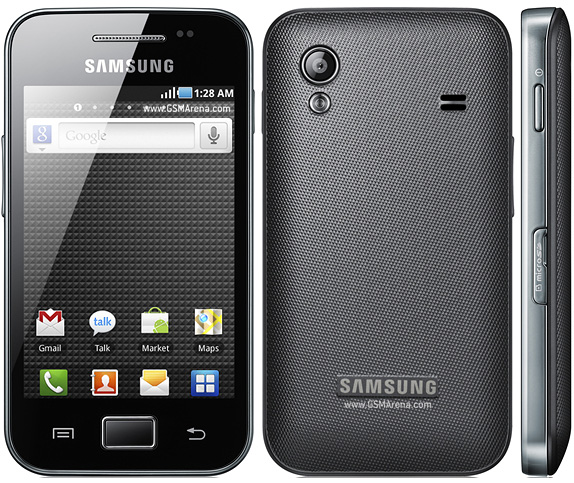
Rooting Samsung Galaxy Ace

How to Root Samsung Galaxy Ace | Step by Step Guide
If you want to root your Samsung Galaxy Ace mobile phone, you need to follow this step by step guide. Most of the common users are scared of rooting their Android phones, but this is not a very tough thing to do.
Root Samsung Galaxy Ace

Samsung Galaxy S2 rooted Rom Dorimanx 7.22 ICS


Feature:


  • Kernel is updated to 3.1.Y and beyond.(hybrid)
  • This is ICS/JB Tuned Kernel only! not supporting any 2.x.x roms!
  • Dual CPU support
  • Default CPU governor: HYPER
  • Samsung Galaxy S2 Rom Omega v16.2 Jelly Bean 4.1.2


    Features:

    Based on firmware XXLSJ Android 4.1.2 (Date: 06/11/2012)
    Kernel PhilZ-cwm6-XXLSJ-3.1
    Modem XXLS6

    Samsung Galaxy S2 Jelly Bean Update


    Some of the Enhancements in the new Jelly Bean Update:

    - Buttery Smooth Performance & Great Stability (Thanks to Project Butter)
    - New TouchWiz Nature UX (Same UI as of the Galaxy S III and Galaxy Note II)
    - Samsung’s Cloud services- Direct Call, Smart Stay and Pop-up Play Features
    - New Widgets From the Galaxy S III
    - 2 Home screen modes
    - New Notifications bar
    - Google Now

    Samsung Galaxy S2 ICS 4.0.4 Update


    There is a new ICS update that will bring your phone to version 4.0.4. You can get it through Kies. If you don't have Kies installed, get it here .


    Beginning August 16, the Samsung Galaxy S II (ICS only) will have a software update to Android version 4.0.3 / Software T989UVLH1 via Samsung Kies only. This update improves device performance. 


    Samsung Galaxy S2 Jelly Bean Rom by Recurssion Rom


    Index:

    About Resurrection Remix ROMChangelogInstallationDownloads and useful linksDonationsContactVideos

    Since version 1.2 of Resurrection Remix the ROM has been based on AOKP, CM9/10 and original Remix ROM builds, this creates

    an awesome combination of performance, customization, power and the most new features, brought directly to your Device
    Many things that in previous versions were tweaked with mods, are now included by default in the ROM so, please enjoy!
    As of August 5th 2012, Resurrection Remix is now also released for Samsung Galaxy SIII (GT-I9300) devices
    Special thanks to the AOKP team, the CM9/10 team, and of course to all the supporters


    Rom Resurrection Remix JB v3.0.4 (GT-I9100)By fr3d0x
    Install Resurrection Remix v3.0.3 Jelly Bean ROM Galaxy S3 (AOKP, CM10) 
    Galaxy S3 Android Jelly Bean ROM (Resurrection Remix v3.0.1, AOKP, CM10) 
    You are a Noob on XDA-Developers [If you really are one, please see this video ]
    AND OF COURSE TO ALL THE SUPPORTERS, DONATORS AND USERS
    Please don't report bugs at this stages, all gonna be solved on future and stable releases.

    Included Mods

    -Toggles

    -Center Clock/No clock/Right Clock
    -AM/PM display
    -AOKP clocks and Digital Clock
    -New Wallpapers
    -Volume rocker moves cursor when keyboard is open (optional)
    -Nova/Stock launcher included
    -%1 battery mod and CircleMod battery
    -Brightness adjustable via statusbar if auto brightness is disabled. It even shows your current brightness percentage as you slide!
    -There's also a "Emergency Broadcast Settings" that allows you to check/uncheck for notifications of "Amber Alerts" and other such Local Emergencies. I personally haven't seen this yet in the other Jelly Builds.
    -Change NavBar targets and long-press actions
    -Battery Bar
    -Change NavBar height
    -Volume Panel (Volume Rocker allows you to change ALL volume levels in one Menu)
    -Notification Counter
    -Disable Boot Animation
    -AOKP Statistics
    -Device Options (Color Tweaks)
    -Led Options (Color and Pulse Rate)
    -NFC Polling Mode (NFC with Screen Off or Locked)
    -Theme Engine
    -Quiet Hours
    -T9 Dialer
    -Notification Shade Wallpaper Changer (And Transparency)
    -Lockscreen Wallpaper Changer
    -Wait To Lock Screen
    -Volume Wake
    -Quick Pin Unlock
    -Phone Face-Down Ringer Setting (Silent/Vibrate)
    -Headphones Plugged in Ringer Setting (Silent/Vibrate)
    -Bluetooth Connection Ringer Setting (Silent/Vibrate)
    -Lockscreen Weather
    -Performance/Color Settings
    -Brightness Control Slider
    -Added Device (Color) Settings To Maguro
    -Flip Phone To Silence Incoming Call
    -NavBar Open/Close Notification Shade Option
    -A Plethora of BugFixes and Updated Translations


    1.- Wipe data / factory reset (mandatory if you coming from ICS version or another ROM)
    2.- Install the Main ROM
    3.- In AROMA installer select "Custom Installation"
    4.- Choose depending of your taste 
    5.- When AROMA installer finish untick the "Reboot Now" option
    6.- When you're back on recovery go to Advanced
    7.- Wipe Dalvik Cache
    8.- Fix Permissions
    9.- Wipe Cache Partition
    10.- Reboot

    IMPORTANT: If you come from another ROM, have some issues or want a really clean installation then follow the 'Extended steps to install the ROM' featured on the General FAQ
    Resurrection Remix Jelly Bean ROM v3.0.6 for Galaxy S2 i9100! by zadomax


    Big thanks to:
    XDA developers
    CM9 team

    Kang (AOKP) team 
    zedomax [For videos]
    GaboWinter [For support]
    cyberboob [For signatures, images and toggles]
    BigDenn [For Bootanimations]


    Download This Document from HERE


    Samsung Wave1 4.04 ICS SLIM OS (Badadroid)


    Samsung wave 1 people have a new operating system to test and use
    Its the same Android 4.0.4 ICS version but with some tweaks and is called the SLIM OS.A much faster, better, efficient and doesn’t lag.
    The major changes that have been made in this version of ICS are
     
    now it works with empty data.img and cache.imgboot animation removed (this fixed the bootloop)Google apps added (Google Play)brightness setting worksidentifies itself as i9000 (Galaxy S)But still no sign of Whatsapp Running on this os as well.  that was a disappointment.
     
    Finally i made three videos for this os
    The Cam video to show boot animationThe screen cast videoAngry birds test on Slim OScheck them out
    The Cam video to show boot animation


    The screen cast video

    Angry birds test on Slim OS

    Installation instructions
    -Boot into your Bada Os
    -Now in phone memory just delete the four files you had put before cache.img, data.img, polishblood_nightlybuild1.img and zimages
    -Download these files - https://adf.ly/DZqZd
    -Now copy all four files inside slim.zip into your phone memory
    -Boot as usual – Press Call and End call simultaneously for around 10-15 seconds and wait

    http://youtube.com/deepakkakudkhttp://facebook.com/badadroid


    http://aslitechguru.blogspot.com/


    Samsung Galaxy ACE 's GAPEL ROM


    I AM NOT RESPONSIBLE FOR UR MISTAKES WHILE FLASHING THIS ROM AND I AM NOT RESPONSIBLE FOR ANY DAMAGE.ALWAYS DO NAND BACKUP ON CWM! AND DWYOR


    Galaxy Ace Plus User... first let me introduce for u all brand new working custom rom for ace plus  by silent developer bhocanGAPLE (GALAXY ACE PLUS ELEGANT) ROM V 1.1 By bhocanThis custom rom base on stock Indonesian firmware S7500DXLE1work =everythingnot working =nothing in this rom- SU- Busybox- Animated pulldown bar- new TW Launcher v 4.5 with 5 dock icon- Custom Bootanimation- New Theme MMS.APK- New Wallpaper on TWWallpaper.apk- ICS LAYOUT STYLE ON SETTING- Animated Background setting- CRT ON AND OFF animation- Increase sdcard read speed- Smooth scrolling- Added 15 toogle button on statusbar- Added extended power menu- Transparent status bar- Theming framework-res1. DOWNLOAD THE FILE FROM LINK BELOW2. COPY TO UR SD CARD.3. REBOOT INTO CWM

    Samsung Galaxy Y DUOS [KERNEL][GT-S6102] Compact V1.2.5 Rooted

    This kernel from source code provided by Samsung "Opensource.samsung.com" For Galaxy Y Duos Device.. source file "GT-S6102_GB_Opensource.zip" .Please read this whole post before you install this kernel in your device..


    My reason for this kernel is to have these:
    1. A fine tuned kernel for my daily use.
    2. compatible with all rom.